Device Details
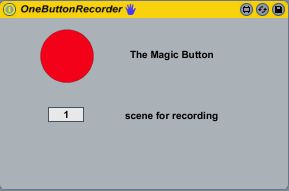
Overview
| Name | Version: | OneButtonRecorder 1.0 |
| Author: | timeyam |
| Device Type: | Audio Effect |
| Description: | Press the Magic Button once to arm the current track for recording. Press it again to start recording in the next free clip slot. Press it a third time to hear your Masterpiece. Further pressing will toggle between recording new clips in free slots and playing them back. |
Details
| Live Version Used: | 8.1 |
| Max Version Used: | |
| Date Added: | Dec 21 2009 18:22:20 |
| Date Last Updated: | Dec 22 2009 11:37:04 |
| Downloads: | 2659 |
| ⓘ License: | None |
Average Rating
(5) Log in to rate this device |
4 |
Files
| Device File: | OneButtonRecorder.amxd |
Comments
hah. brilliant.
Posted on December 23 2009 by synnack |
Report Issue
Great!
Posted on December 25 2009 by kjetilhu |
Report Issue
Very cool!
Posted on December 25 2009 by bernardnoir |
Report Issue
Great!
Posted on December 28 2009 by Crampe |
Report Issue
this little tool is really useful.
One thing i wish we could do with:
set the launch mode, loop or not and quantification clip for each onebuttonrecorder patch loaded by track.
Like that, i can use a onebuttonrecorder patch on one track with quantification as none and launch mode as gate with no loop on one track,
and for example loop, trigger and 1/4 quantification on another one, etc...
Great to have different "on the fly" record/play.
Any chance to see that on future update?
One thing i wish we could do with:
set the launch mode, loop or not and quantification clip for each onebuttonrecorder patch loaded by track.
Like that, i can use a onebuttonrecorder patch on one track with quantification as none and launch mode as gate with no loop on one track,
and for example loop, trigger and 1/4 quantification on another one, etc...
Great to have different "on the fly" record/play.
Any chance to see that on future update?
Posted on December 29 2009 by lek |
Report Issue
First of all thanks for your nice comments!
Now to your requests:
-Launch mode is currently not part of the API, so i can't implement that for now. But I see, that this would be a cool feature and I could give it a try when the API grows some day.
-Similar problem with quantification. Only the global quantification is part of the API now.
-Looping should be no problem, I will try to do this.
-I'll think about additional arm, play and record buttons.
My main goal for the next version, is to implement a track chooser, so one can use one patch for the hole live set. I'm working on some sort of visual feedback for this in Jitter, but it doesn't behave very well now.
Now to your requests:
-Launch mode is currently not part of the API, so i can't implement that for now. But I see, that this would be a cool feature and I could give it a try when the API grows some day.
-Similar problem with quantification. Only the global quantification is part of the API now.
-Looping should be no problem, I will try to do this.
-I'll think about additional arm, play and record buttons.
My main goal for the next version, is to implement a track chooser, so one can use one patch for the hole live set. I'm working on some sort of visual feedback for this in Jitter, but it doesn't behave very well now.
Posted on December 31 2009 by timeyam |
Report Issue
can't wait for the next version, this is sweet already, but the track chooser is all I need on top of this
Posted on December 31 2009 by dubgil |
Report Issue
Great, but I hope that choosing the launch mode before record a clip, should be more easy in Live 9...or that there will be possible to do this in a M4L-patch. Looking forward to the next update!
K.
K.
Posted on January 04 2010 by kjetilhu |
Report Issue
I love the idea, but unfortunately this device just isn't working for me. It won't arm the track, and if I arm it myself, it'll only trigger record and then playback on a single clipslot in the device's track.
Did things break with the 5.1.2 update, or am I missing something?
Did things break with the 5.1.2 update, or am I missing something?
Posted on January 28 2010 by nonagon |
Report Issue
Thanks!!
^_^
^_^
Posted on April 04 2010 by chisao |
Report Issue
Just what I've wanted since I started using live. nice work
Posted on August 16 2010 by deanobro |
Report Issue
this is such a fantastic device... i cant thank u enough...
i just have on problem with it:
I need to launch the button with a drumpad from my spd-s... unfortunately it doesnt send a note off message... in other words, it is not momentary...
this means i do have to hit the pad twice to make it work as it should... is there any way to to configure that thing, to make it work as i need it, or do i need to implement a miditranslator???
thx 4 your help
i just have on problem with it:
I need to launch the button with a drumpad from my spd-s... unfortunately it doesnt send a note off message... in other words, it is not momentary...
this means i do have to hit the pad twice to make it work as it should... is there any way to to configure that thing, to make it work as i need it, or do i need to implement a miditranslator???
thx 4 your help
Posted on September 23 2010 by dergreule |
Report Issue
Posted on October 02 2010 by nekkey |
Report Issue
Hi Timeyam,
You can add the function to disarm when the clip starts to play,
I tried but lost the quantization clip,
Can you help me?
You can add the function to disarm when the clip starts to play,
I tried but lost the quantization clip,
Can you help me?
Posted on October 06 2010 by meme |
Report Issue
Hi there, thanks for the brilliant device.
I desperately need a MIDI looper (exactly like looper but with midi).
This device works perfectly. But I have a PROBLEM: I need to automate it so it records certain parts of the piece.
I can put the button on (live-button) but, as soon as the automation is past, the track turns dark brown, the 'back to arrangement' button turns red, the device won't follow automations any more.
I'm pretty sure I'm doing a simple thing very wrong...can anyone help me?
Thanks!
I desperately need a MIDI looper (exactly like looper but with midi).
This device works perfectly. But I have a PROBLEM: I need to automate it so it records certain parts of the piece.
I can put the button on (live-button) but, as soon as the automation is past, the track turns dark brown, the 'back to arrangement' button turns red, the device won't follow automations any more.
I'm pretty sure I'm doing a simple thing very wrong...can anyone help me?
Thanks!
Posted on November 08 2010 by enricobertelli |
Report Issue
Posted on January 08 2011 by aukleive |
Report Issue
Many many thanks ! I will study that patch as it gets very close to something similar i needed...
Wonderful !
Wonderful !
Posted on February 21 2011 by Saturnin79 |
Report Issue
Please, I don't understand how to use it..?
Posted on June 21 2011 by flolachevre |
Report Issue
Login to comment on this device.
Browse the full library