Device Details
Overview
| Name | Version: | Korg MS-2000 2.0 |
| Author: | grymmjack |
| Device Type: | MIDI Effect |
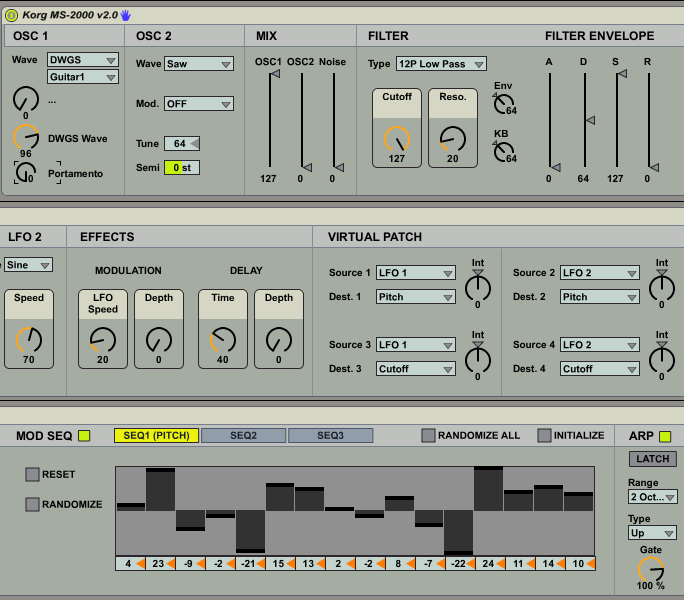
| Description: | *updated screenshot* Here is the second version of the Korg MS-2000 Hardware Control device. I've implemented inbound NRPNs, multislider instead of knobs for modseq1-3 supplemented by live number boxes with sane defaults. I've hardwired SEQ1 to pitch (this is how it is at the factory and I can't think of a reason why I wouldn't want to use pitch for SEQ1 if you can feel free to fork it for whatever you like). I've modified the selectors when choosing OSC1 wave to hide/show the DWGS waveform picker and I've linked picking a wave from that menu to adjust the knob (though I couldn't do it from knob to menu without some problems). I added tab support for the mod seq section (this is much more elegant IMO!). Next up will be a skinned GUI and a smaller "macro window" with an open button to open the full GUI, etc. This is a lot fun!!! The inbound NRPNs aren't perfect, but they are good enough. This let's the actual MS-2000 device control every aspect of the patch. I've saved the patch frozen, and it includes all the assets in the frozen patch in my testing. (no zip file this time) though I will be making some presets and bundling those together in a zip file to distribute after the GUI is done :) Hope you like it! Thanks for the help and encouragement. --- Here is a first version of a Korg MS-2000 Hardware Control device. I will learn bpatcher and windowing eventually and make a better UI, but for now this works. I cannot figure out how to receive NRPNs in an elegant way from the MS-2000, but sending them TO the MS-2000 works. All CC's and NRPNs are supported, and additionally where applicable ctlins for the MS-2000 default CC messages are hardwired using the factory CC default CC#s. This creates a more symbiotic relationship between Live and the MS-2000 because changing something on the MS-2000 (any knob or button on it's surface that sends a CC will update the M4L MIDI Device). I wish I could do sysex somehow, but don't know how. Eventually I'll clean this up and put the modules in subpatchers. So this is based on my work done for the microKORG. Most of the work was reusable (thanks Korg). I've removed the program select and added a comprehensive Mod Seq including an initialize and randomize per ModSeq (1-3) and initialize and randomize all buttons which work for all ModSeqs at once. I added the functionality where Control 1 and Control 2 knob labels on OSC1 change based on the waveform selected. I also added a DWGS waveform picker. Some improvements I'd like to make: - Figure out how to make the DWGS waveform picker only show itself if DWGS is chosen for OSC1 waveform. - Clean up and encapsualte modules into subpatchers - Create a mini view that sits in the rack, then a button to open a big beautiful skinned display :) - Modify the ModSeq value controls from knobs to a nice bipolar bar graph. - Integrate MS-2000 sending NRPNs to change the M4L Device control values (to enhance the symbiotic relationship) *NOTE* To install, unzip the file into your Live Library/Presets/MIDI Effects/Max MIDI Effect directory. There is a js file dependency (included in the zip file) that must be installed in the same place as the axmd file. |
Details
| Live Version Used: | 8.2.5 |
| Max Version Used: | 5.1.8 |
| Date Added: | Sep 19 2011 06:24:57 |
| Date Last Updated: | Mar 31 2021 19:48:50 |
| Downloads: | 5 |
| Website: | https://github.com/grymmjack/max4live/tree/main/MS-2000 |
| ⓘ License: | AttributionNonCommercialShareAlike |
Average Rating
Log in to rate this device |
-n/a- |
Comments
wow.. don't have a korg but i'm very curious how you managed the NRPNs... atm i'm working on a patch for the mopho myself
i'm very new to max but bpatcher is very easy and makes everything a lot more accessible..
i'm very new to max but bpatcher is very easy and makes everything a lot more accessible..
Posted on September 19 2011 by myus |
Report Issue
all you do is save your current patch as .maxpatch. open it inside a bpatcher via the inspector. Then you a series of messages of offset x y (which you can get from the inspector) to move bpatcher window. Basically keep the inspector window open, click your mouse on the bpatcher and move it around till you get what you want in view, record that value and make a offest for it. Then make a menu to control the offsets. If you want an example i made one to control the NordLead2x, you can use that as an example of how to do that. find it at http://www.maxforlive.com/library/device.php?id=607
Posted on September 19 2011 by protocol |
Report Issue
the tab object is your friend here... I remember there's a example in that maxhelp..
Posted on September 20 2011 by myus |
Report Issue
maxhelp of of the bpatcher sorry... if you click on "patcher more"
Posted on September 20 2011 by myus |
Report Issue
Figured out how to do what I needed. Thanks guys. Learned a lot in the process. Check out the new version and let me know what you think. I did not encapsulate anything yet it was kind of anti-productive when I had started encapsulating into patchers :)
bpatcher and tabs were learned, and so was global javascript variables and bondo and pack/unpack.
Max4Live rules.
Thanks again for your help!
bpatcher and tabs were learned, and so was global javascript variables and bondo and pack/unpack.
Max4Live rules.
Thanks again for your help!
Posted on September 28 2011 by grymmjack |
Report Issue
Hey ! thanks for building this, It's working great with my MS2000 in the keyboard rack on the other side of the studio. Would love if you could make a randomize everything button. A few years back I use to use a PC program to send random settings to it which gave some interesting results but overall its really neat mate. I always liked the sound of the ms2000 sits nice in the mix. great to have all the controls. using touchOSC and live control. cheers
Posted on June 27 2012 by modulenz |
Report Issue
thanks dude I was dreaming with something like this
I register myself in the forum just to thank you THX
I register myself in the forum just to thank you THX
Posted on July 27 2012 by casavan |
Report Issue
NP casavan.
Posted on October 14 2012 by grymmjack |
Report Issue
modulenz; i'll look into a randomize function.
Posted on October 14 2012 by grymmjack |
Report Issue
awesome i found v2! just picked up a korg ms2000r and started sequencing with ableton ! this is coool.
can't wait to try it out tomorrow.
i'm on Live 9, m4l 6.1.2
cheers
can't wait to try it out tomorrow.
i'm on Live 9, m4l 6.1.2
cheers
Posted on June 21 2013 by uxeexu |
Report Issue
so far.... loving the device.
i'm noticing one wee bug. when mousing inside the sequencer, sometimes it randomly resets to an "init" state. really great device to use with other midi fx in ableton!
thanks for your work!
i'm noticing one wee bug. when mousing inside the sequencer, sometimes it randomly resets to an "init" state. really great device to use with other midi fx in ableton!
thanks for your work!
Posted on June 21 2013 by uxeexu |
Report Issue
This device looks really good, does anyone know where I can find it as the link does not work?
Posted on February 09 2014 by Science |
Report Issue
The link works. I just tried it. Maybe right click on it and choose save as? The file is indeed on my server.
Posted on February 10 2014 by grymmjack |
Report Issue
Also FTR: I don't have an MS2K anymore. I sold it off when money was a little tight last year. However, everything in this project is in the download so I grant access to anyone (as before but now since I have NO MS2K I cannot maintain this and see some people made FRs that I can no longer fulfill) to do whatever they want with it :)
Thanks for all the support I appreciate it.
Thanks for all the support I appreciate it.
Posted on February 10 2014 by grymmjack |
Report Issue
Thanks for the response grymmjack. I have been able to download your mircokorg device but not this one. When I click on the link, it just appears as script. Unlike the other devices on the site, it doesn't have a download button.
Sorry to be a pain, I looked at your device it looks so cool, hopefully I will get the chance to use it :-)
Sorry to be a pain, I looked at your device it looks so cool, hopefully I will get the chance to use it :-)
Posted on February 11 2014 by Science |
Report Issue
Science, the link works fine for me in Safari on a Mac. Does this work for you? I put it on my dropbox for you. https://dl.dropboxusercontent.com/u/18262281/KorgMS-2000v2.0.amxd
Posted on February 11 2014 by synnack |
Report Issue
thank you so much!!!!!! Synnack and Grymmjack you are stars
Posted on February 15 2014 by Science |
Report Issue
Thanks for this - Great! If you need help with the GUI Design let me know - i'm a designer - looking to get into Instrument GUI Design.
Posted on June 26 2014 by DerekJones |
Report Issue
Hi all,
DL'd the axmd file from here and was not able to sync it with the Korg. I found the zip file elsewhere with the js file included, but I am unsure of how to install it in order to get the device working. Any help is appreciated.
DL'd the axmd file from here and was not able to sync it with the Korg. I found the zip file elsewhere with the js file included, but I am unsure of how to install it in order to get the device working. Any help is appreciated.
Posted on September 09 2014 by sereptie |
Report Issue
Hi,
I can't make this device work.
Really sorry but I'm not a programmer, I'm just an user...
I found a nrpn.js on github and put it in the same folder of the device, but max is still give me the "js:illegal message selector"
Can you help me?
I can't make this device work.
Really sorry but I'm not a programmer, I'm just an user...
I found a nrpn.js on github and put it in the same folder of the device, but max is still give me the "js:illegal message selector"
Can you help me?
Posted on March 05 2017 by mismatched |
Report Issue
Hi there,
Is there any chance to reload the link that you have shared to us? it looks like your link does not work anymore.
Thank you in advance.
Is there any chance to reload the link that you have shared to us? it looks like your link does not work anymore.
Thank you in advance.
Posted on November 07 2017 by HSIK20 |
Report Issue
Please, there is a chance to upload the file again ? thanks in advance !
Posted on January 08 2018 by Tiza |
Report Issue
Any chance we can get copy of this?
cheers
cheers
Posted on July 27 2018 by stevenclements |
Report Issue
Yep right click
http://www.soundgasmdesign.com/public/Korg%20MS-2000%20v2.0.amxd
Save as... and it downloads
THANKS A BUNDLE!
http://www.soundgasmdesign.com/public/Korg%20MS-2000%20v2.0.amxd
Save as... and it downloads
THANKS A BUNDLE!
Posted on July 27 2018 by stevenclements |
Report Issue
hi everyone! please give me a mirror to try this pretty shit)))
Posted on January 07 2019 by boo |
Report Issue
Any chance this could be re-up'ed?
Posted on May 06 2019 by telengard |
Report Issue
I put all my MaxForLive stuff on my GitHub.
https://github.com/grymmjack/max4live/tree/main/MS-2000
https://github.com/grymmjack/max4live
Also has microKORG thingy:
https://github.com/grymmjack/max4live/tree/main/microKORG
https://github.com/grymmjack/max4live/tree/main/MS-2000
https://github.com/grymmjack/max4live
Also has microKORG thingy:
https://github.com/grymmjack/max4live/tree/main/microKORG
Posted on March 31 2021 by grymmjack |
Report Issue
Login to comment on this device.
Browse the full library
thank you!