Device Details
Overview
| Name | Version: | Keyfollow 1.1 |
| Author: | BillyNotReally |
| Device Type: | MIDI Effect |
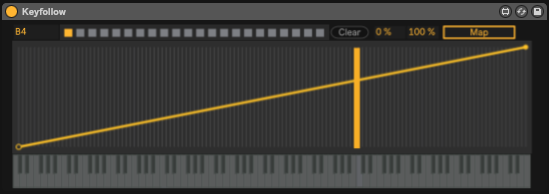
| Description: | ENTER THE LINK IF YOU WANT TO DONATE, THANK YOU! Ever wanted to control a Live parameter with MIDI notes like you do with filters? Now you can. Added some presets and a curve function for more customization. It should work with older versions. Feedback is always appreciated! Version 1.1 update Special thanks OCH for fixing the "preset not saving" problem. Thank you very much! (http://maxforlive.com/profile/user/och) (2018-12-22) |
Details
| Live Version Used: | 10.0.1 |
| Max Version Used: | 8.0.1 |
| Date Added: | Oct 17 2018 18:20:42 |
| Date Last Updated: | Jan 17 2019 02:48:20 |
| Downloads: | 1139 |
| ⓘ License: | None |
Average Rating
(2) Log in to rate this device |
5 |
Files
| Device File: | Keyfollow1.1.amxd |
Comments
hi, great device here! one thing that would be a big improvement imo is if customized mapping ranges saved within a set. I tried saving and loading this in a set, but it returns to the default. Being able to save presets would be awesome too. cheers!
Posted on November 01 2018 by KalanSorion |
Report Issue
@KalanSorion
I hear you. Changing a preset, i.e. shift clicking it, will not persist after the session is reloaded. Here is my fix: https://goo.gl/riJtDJ
@BillyNotReally
Update ;)
I hear you. Changing a preset, i.e. shift clicking it, will not persist after the session is reloaded. Here is my fix: https://goo.gl/riJtDJ
@BillyNotReally
Update ;)
Posted on December 22 2018 by OCH |
Report Issue
Hi there! I slightly modified this device to recognize MIDI CC and pitch bend automation, so I could map those input parameters to dials.
A video of it in action with pitch bend is here: https://www.instagram.com/p/BsO09dqAr6f/
A video of it in action with pitch bend is here: https://www.instagram.com/p/BsO09dqAr6f/
Posted on January 06 2019 by NickHydeViolin |
Report Issue
@OCH Thank you so much!!
Posted on January 17 2019 by BillyNotReally |
Report Issue
@NickHydeViolin Wow I'm so happy that you did this with my patch, great job!
Posted on January 17 2019 by BillyNotReally |
Report Issue
great device, thank you!
Posted on September 12 2019 by xasancle |
Report Issue
probably no one cares about this anymore, but i need to remove the place where I hosted the file I shared back in 2018 on this thread. So, I moved it here now:
https://go.och.pw/keyfollow1.2
apologies for any possible redundancy
https://go.och.pw/keyfollow1.2
apologies for any possible redundancy
Posted on January 31 2024 by OCH |
Report Issue
Hi Billy,
"Probably no one cares about this anymore" - I certainly do!
Thank you kindly for this great plugin; it's exactly what I needed right now!
Use case:
1. Put a single tom onto your Drum Rack
2. Make a separate MIDI track routed to that tom's cell (to be able to play it in different pitches without adding cells)
3. Use this plugin to have the panning of the toms follow the pitches in detailed ways
Perfect! Massive thanks again! And feel free to guide me to a donation place (couldn't find one)! Rated 5. 😎
"Probably no one cares about this anymore" - I certainly do!
Thank you kindly for this great plugin; it's exactly what I needed right now!
Use case:
1. Put a single tom onto your Drum Rack
2. Make a separate MIDI track routed to that tom's cell (to be able to play it in different pitches without adding cells)
3. Use this plugin to have the panning of the toms follow the pitches in detailed ways
Perfect! Massive thanks again! And feel free to guide me to a donation place (couldn't find one)! Rated 5. 😎
Posted on January 18 2026 by HavenBreaks |
Report Issue
Login to comment on this device.
Browse the full library