Device Details
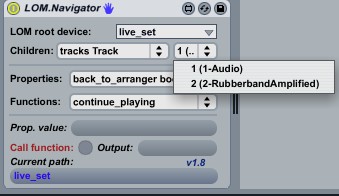
Overview
| Name | Version: | LOM.Navigator 1.8 |
| Author: | ShelLuser |
| Device Type: | Audio Effect |
| Description: | The LOM.Navigator will allow you to get all available properties and change their values as well calling any function from the Live Object Model (which is all part of the 'Live API'). Function parameters can be specified. This patch also gives you full access to the control surfaces scripts, but pay close attention to the instructions on how to use it. Keep in mind: This patch is licensed under the Apache v2.0 license. See inside the patch (or the URL mentioned) for more details. |
Details
| Live Version Used: | 8.2.1 |
| Max Version Used: | 5.1.9 |
| Date Added: | Oct 24 2010 00:34:19 |
| Date Last Updated: | Aug 10 2012 08:45:21 |
| Downloads: | 2531 |
| ⓘ License: | Attribution |
Average Rating
(1) Log in to rate this device |
4 |
Files
| Device File: | LOM.Navigator.amxd |
Comments
Yeeehaw, it worked ;-)
Posted on October 24 2010 by ShelLuser |
Report Issue
Posted on October 24 2010 by mingus |
Report Issue
No doubt it would be great to see some videos of some of the things you intend on doing with this.
I'm very intrigued by it, clueless at the same time. I'm mean I have some speculations, but I would really like to understand the control surface part better. Or anything for that matter. I feel like I just need to "see" what YOU do with it and why.
I'm very intrigued by it, clueless at the same time. I'm mean I have some speculations, but I would really like to understand the control surface part better. Or anything for that matter. I feel like I just need to "see" what YOU do with it and why.
Posted on October 24 2010 by JuanSOLO |
Report Issue
Hi gang,
@mingus: Yes, its possible to edit control surfaces as well. The full archive (see url) also comes with a readme file which explains the basics and functionality. But in short it allows for control over properties and functions in any class it can reach (so including components which come with the control surfaces (components & controls).
@JuanSOLO: Hmm, I'm not so much of a video guy myself (don't have the software for that either) but I guess I could devote a blog post on this critter. Do keep in mind that my main usage here is study; both expanding my M4L expertise as well as the stuff you can do with it.
The part which I like best is when this navigator can actually display inconsistencies in the LOM as setup by Ableton & C'74.
@mingus: Yes, its possible to edit control surfaces as well. The full archive (see url) also comes with a readme file which explains the basics and functionality. But in short it allows for control over properties and functions in any class it can reach (so including components which come with the control surfaces (components & controls).
@JuanSOLO: Hmm, I'm not so much of a video guy myself (don't have the software for that either) but I guess I could devote a blog post on this critter. Do keep in mind that my main usage here is study; both expanding my M4L expertise as well as the stuff you can do with it.
The part which I like best is when this navigator can actually display inconsistencies in the LOM as setup by Ableton & C'74.
Posted on October 24 2010 by ShelLuser |
Report Issue
Well, it took me a while but as promised I've wrote up a blog post about both the theory behind the Live Object Model as well as some more in depth explanation on how to use the LOM.Navigator.
See:
http://blog.synthfan.info/2011/04/11/m4l-diving-into-the-live-object-model.aspx
See:
http://blog.synthfan.info/2011/04/11/m4l-diving-into-the-live-object-model.aspx
Posted on April 11 2011 by ShelLuser |
Report Issue
Hey Dude,
Im struggling a bit here, Im trying to access a chain in a drumrack to access the parameters on the device inside that chain and even though i have studied your writings here unless im doing something completely wring it is not working,,, I even stuck you LOW navigator after the rack but even going through the steps it doesent seem to be picking up the chain even though one is there? Any Ideas?
thanks XG
Im struggling a bit here, Im trying to access a chain in a drumrack to access the parameters on the device inside that chain and even though i have studied your writings here unless im doing something completely wring it is not working,,, I even stuck you LOW navigator after the rack but even going through the steps it doesent seem to be picking up the chain even though one is there? Any Ideas?
thanks XG
Posted on November 16 2011 by 10Guitars |
Report Issue
sorry about typos!
Posted on November 16 2011 by 10Guitars |
Report Issue
It took me too long but I finally came up with a tutorial which explains how to navigate / access the Live Object Model itself and also explains how to use the navigator, see this link:
http://synthfan.info/lom-navigator-tutorial/
http://synthfan.info/lom-navigator-tutorial/
Posted on July 22 2012 by ShelLuser |
Report Issue
can't thank you enough. this will perfectly facilitate my script writing :) thanks for the time you have put in to this wonderful patch.
Posted on September 01 2012 by Emerah |
Report Issue
Love it i also love the knight rider. but do you have a device that can contrtol clip off state value on more than 1 clip slot
Posted on October 18 2014 by 3phase |
Report Issue
It seems the http://synthfan.info/lom-navigator-tutorial/ web page is not available. Does anyone have links to the tutorials or documentation? Thanks!
Posted on July 27 2015 by TaoEntropy |
Report Issue
try: http://synthfan.catslair.org/mytutorials/lom-navigator/
Posted on October 21 2015 by ShelLuser |
Report Issue
Using the LOM you can use device DeviceType to get type 3 (audio or whatever) etc for a device in a track. Specifically what message is being sent to live.observer etc here, as if you try to do this in edit mode it immediately clears itself?
Posted on October 16 2016 by bugcompass |
Report Issue
I can't find any download link on http://synthfan.catslair.org/downloads/m4l-patches/ ...?
Posted on July 13 2017 by Henrik |
Report Issue
^ Nevermind. Haha, I somehow overlooked the "too" obvious blue Download button here on this page.
Posted on July 13 2017 by Henrik |
Report Issue
This made my day !!!
Posted on October 31 2018 by elzinko77 |
Report Issue
Seriously, this needs to be included as a default device with Suite. Goddam godsend for figuring out what's available in the LOM for M4L *and* for Python remote scripts.
Posted on March 07 2022 by DeepSeaHaggis |
Report Issue
Login to comment on this device.
Browse the full library