Device Details
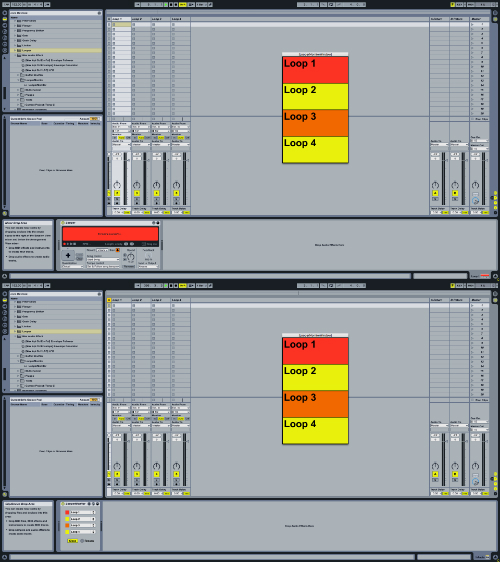
Overview
| Name | Version: | LooperMonitor 1.0 |
| Author: | michaelklier |
| Device Type: | Audio Effect |
| Description: | This device lets you monitor the states of up to 4 Looper devices in a live set in a separate floating, freely positionable window. It's possible to use multiple instances of the device to monitor additional Looper devices. This is my first max4live device. Any feedback on how to make this a better device is appreciated! |
Details
| Live Version Used: | 8.2.6 |
| Max Version Used: | 5.1.9 |
| Date Added: | May 23 2012 08:17:32 |
| Date Last Updated: | May 23 2012 08:18:16 |
| Downloads: | 1018 |
| ⓘ License: | None |
Average Rating
Log in to rate this device |
-n/a- |
Files
| Device File: | LooperMonitor.amxd |
Comments
i love you
Posted on May 30 2012 by milk |
Report Issue
:D
Posted on June 05 2012 by michaelklier |
Report Issue
does what it says. if this was a bit smaller it'd be perfect for me - on a 12 inch screen it takes up abit too much real estate
Posted on June 07 2012 by milk |
Report Issue
Cool stuff. You might want to check out the device LooperOSC I just put up. Cheers
Posted on June 12 2012 by jengel |
Report Issue
youpi !!!
thanks thanks
thanks thanks
Posted on June 13 2012 by mixolive |
Report Issue
This is a great device. The only thing I would like to see added would be the difference between a loop being stopped and the loop being cleared. Like black versus gray or something. But great device and is going into my live looping set.
Posted on July 13 2012 by roninmbattousai |
Report Issue
the loop monitor will not detect loopers that are with in racks
Posted on November 09 2012 by bosonHavoc |
Report Issue
Many thanks for the LooperMonitor, very handy.
I Having been trying to learn from the patch but I cannot work out how to edit the size of the view window.
Any help appreciated.
I Having been trying to learn from the patch but I cannot work out how to edit the size of the view window.
Any help appreciated.
Posted on March 26 2013 by pwdm |
Report Issue
Hi,
Thank you for the monitor.
I'm new to maxfor live..
So is it possible to read out the status of looper and start an audio sample e.g. out of sampler, routed only to my in ears?
The next bar 1 would be perfect for me
I'd like to change from play to overdub I hit my pad and on the next 1, the sampler says e.g. "over" in my in ear....
If this would be possible I needn't have a look at the screen at all...
Thanks for your work again
Thank you for the monitor.
I'm new to maxfor live..
So is it possible to read out the status of looper and start an audio sample e.g. out of sampler, routed only to my in ears?
The next bar 1 would be perfect for me
I'd like to change from play to overdub I hit my pad and on the next 1, the sampler says e.g. "over" in my in ear....
If this would be possible I needn't have a look at the screen at all...
Thanks for your work again
Posted on April 21 2013 by lichtigroovt |
Report Issue
Hi, is it possible to get in touch with you?
Posted on January 28 2014 by lqud |
Report Issue
Hello! I would like to order device modification, ready to pay for this...
if possible contact me please:
vsenichev (at) gmail (dot) com
if possible contact me please:
vsenichev (at) gmail (dot) com
Posted on October 20 2018 by vasya |
Report Issue
Hi, any chance to get an updated version of this great device? Thank you very much.
Posted on October 27 2018 by youarenot |
Report Issue
For ALL You're dreaming an update
His here
http://www.maxforlive.com/library/device/5092/mikado-individual-loopermonitor-2018
huuuu just upload take me informed
thank
His here
http://www.maxforlive.com/library/device/5092/mikado-individual-loopermonitor-2018
huuuu just upload take me informed
thank
Posted on November 05 2018 by spiralune |
Report Issue
Login to comment on this device.
Browse the full library