Device Details
Overview
| Name | Version: | MDD SnAkE 3.2.3 with visual gate monitoring 1.0 |
| Author: | an21 |
| Device Type: | MIDI Generator |
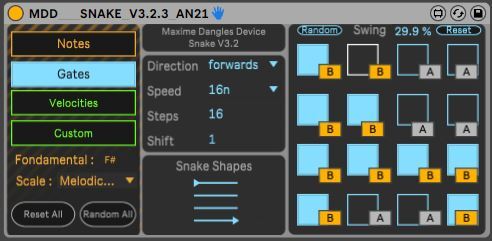
| Description: | *** In english *** First, big up to Maxime Dangles, the creator that share for free his science. I learn m4l that way. That is a version with visual monitoring from a usb device such as a BCF2000. You need to configure your usb device with : CC / val 1 : 127 / val 2 : 0 / toogle on. Map each button of your controller with each gates (blue square) AND "A" / "B" button I made. Run your snake : - it should appears blinking off when the snake eat a Gate ON - it should appears blinking on when the snake eat a Gate OFF Enjoy !! You can also buy me a virtual coffee there : https://buymeacoffee.com/an21 *** En français *** Tout d'abord, gros big up pour Maxime Dangles le createur du serpent qui partage sa science gratuitement. Respect. J'ai ajouté mon grain de sel pour rendre autonome un controlleur sans forcément regarder l'interface de l'ordi. Il s'agit d'une version avec retour visuel depuis un périphérique USB tel qu'un BCF2000. Vous devez configurer votre périphérique USB avec : CC / val 1 : 127 / val 2 : 0 / Toogle on. Mappez chaque bouton de votre usb controleur avec chaque Gate (carré bleu) ET le bouton "A" / "B" que j'ai créé. Exécutez votre serpent en appuyant sur Play : - Ca doit brièvement clignoter OFF lorsque le serpent rencontre une Gate ON - Ca doit brièvement clignoter ON lorsque le serpent rencontre une porte OFF Amusez vous bien !! Vous pouvez également me payer le café virtuellement : https://buymeacoffee.com/an21 |
Details
| Live Version Used: | 11.3.35 |
| Max Version Used: | 8.5.8 |
| Date Added: | Nov 15 2024 20:31:49 |
| Date Last Updated: | Nov 20 2024 20:28:15 |
| Downloads: | 1285 |
| ⓘ License: | None |
Average Rating
(1) Log in to rate this device |
1 |
Files
| Device File: | MDD___SNAKE_V3.2.3_with_gate_monitoring.amxd |
Comments
You uploaded a Zero byte file. LOL
Posted on November 17 2024 by irishmos |
Report Issue
The file has zero bytes
Posted on November 17 2024 by stuartpaulwood |
Report Issue
Ok that's done. Thx to notice. When I upload a new device, I have a jpg problem that blocks the .amxd upload.
Cheers !
An21
Cheers !
An21
Posted on November 20 2024 by an21 |
Report Issue
Hi... Great idea!
I wanted to clarify the mapping of the Gates and A/B buttons please.
Should I map both (for the same step) to the same button on my controller, or to different buttons on my controller?
I tried mapping to the same button and (I think because the device is sending out a midi note) it made the Gate buttons on the device change state each time the metronome passed it. So the Gate was on, it would change it to on, and visa versa.
But if I have to map the Gate and A/B buttons to a different button on my controller, I need to use 32 buttons on the controller for a 16 step sequence, which I didn't think is how you would make the device work...?
Any advice appreciated, cheers
I wanted to clarify the mapping of the Gates and A/B buttons please.
Should I map both (for the same step) to the same button on my controller, or to different buttons on my controller?
I tried mapping to the same button and (I think because the device is sending out a midi note) it made the Gate buttons on the device change state each time the metronome passed it. So the Gate was on, it would change it to on, and visa versa.
But if I have to map the Gate and A/B buttons to a different button on my controller, I need to use 32 buttons on the controller for a 16 step sequence, which I didn't think is how you would make the device work...?
Any advice appreciated, cheers
Posted on March 13 2026 by Samovallan |
Report Issue
*So the Gate was on, it would change it to OFF, and visa versa*
Posted on March 13 2026 by Samovallan |
Report Issue
Login to comment on this device.
Browse the full library