Device Details
Overview
| Name | Version: | Jukebox 1.0 |
| Author: | sy9 |
| Device Type: | Audio Effect |
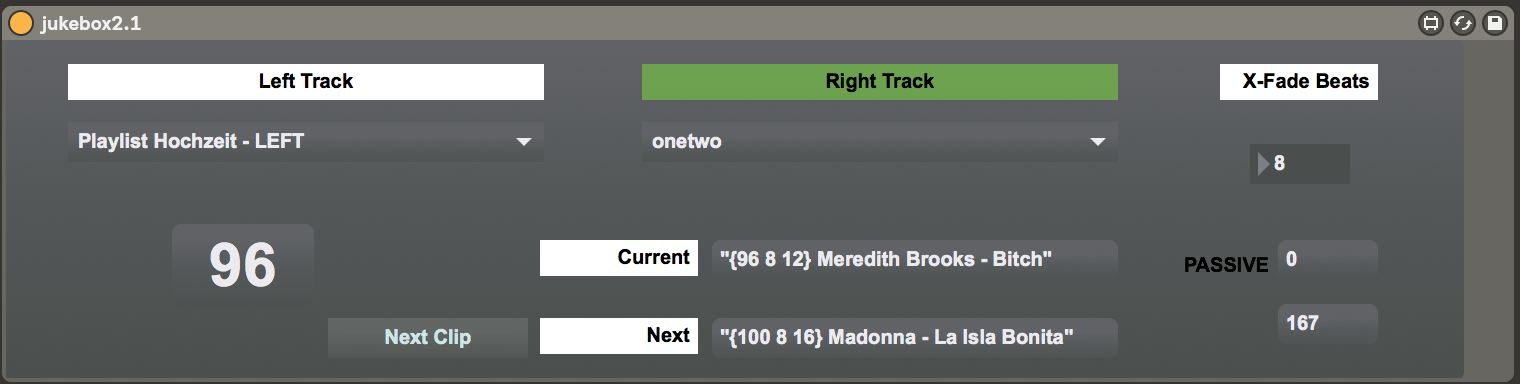
| Description: | Autoplay Clips in Live. Choose two tracks (left + right), hit play on the first clip and this M4L app will automagically launch the next clip. Features: * Prepend clip names with tempo, intro + outro # of beats * Smoothly adjusts tempo from one clip to the other Example clip names: {100} Artist - Nice Song {120 16 32} Another one - 16 beats intro and 32 beats outro Todo: * add track volume control to fade in new songs Note that this is the very first device I ever built in Max and it's kind of beta! Suggestions and improvements welcome! Cheers, Steffen |
Details
| Live Version Used: | 10.0.1 |
| Max Version Used: | 7.3.5 |
| Date Added: | Aug 26 2018 15:09:12 |
| Date Last Updated: | No Updates |
| Downloads: | 284 |
| ⓘ License: | None |
Average Rating
Log in to rate this device |
-n/a- |
Files
| Device File: | jukebox2.1.amxd |
Comments
Login to comment on this device.
Browse the full library
I have some ideas as to how to implement your volume automation as well as a few other ideas to further increase the functionality of the device.
You can find me via my user name at g mail
If I end up building any of these other ideas on, I'll be glad to send it to you.
Cool device!