Device Details
Overview
| Name | Version: | Track Device View 2 1.0 |
| Author: | KOMOFORGE |
| Device Type: | Audio Effect |
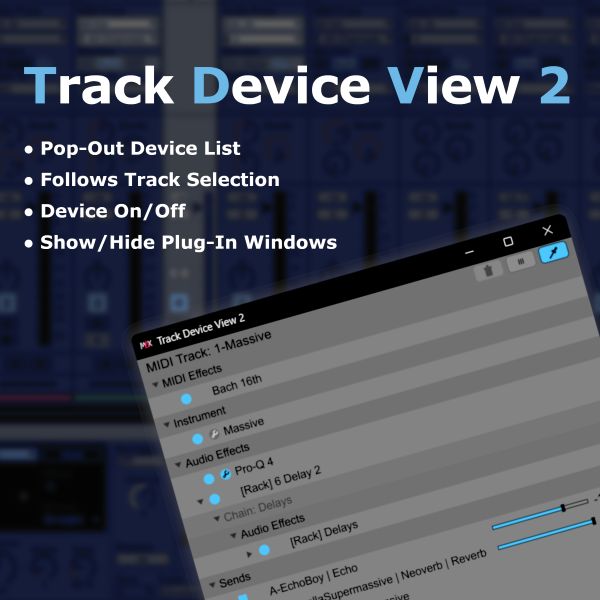
| Description: | Track Device View 2 is a Max for Live utility for Ableton Live 12.4.3. When a track contains many devices, Live’s horizontal Device View can become difficult to scan. Track Device View 2 displays the currently selected track’s device chain in an easy-to-read vertical list. Insert Track Device View 2 on one track and open the pop-out window. When you select another track in Live, the list automatically updates to follow the newly selected track. You do not need to insert Track Device View 2 on every track. From the pop-out window, you can select devices, turn them on or off, collapse or expand devices and Racks, open or close supported third-party plug-in windows, adjust Send levels, and view devices on related Return Tracks. Track Device View 2 helps you manage device-heavy tracks without constantly scrolling through Live’s Device View. Main features: * Easy-to-read vertical list of the selected track’s device chain * Track-following pop-out window * MIDI Effects, Instrument, and Audio Effects sections * Rack and Chain display, including nested Racks up to a limited depth * Click a device name to select that device in Live * Double-click a device name to select and collapse or expand that device in Live’s Device View * Collapse or expand all devices on the selected track * Toggle devices on or off directly from the list * Ctrl-click and Shift-click multiple selection * Toggle multiple selected devices on or off together * Open or close supported third-party plug-in windows from the list * Send names, values, and sliders displayed in the pop-out window * Adjust Send levels directly from the pop-out window * Expand Send rows to view and control devices on related Return Tracks * Delete selected devices, Racks, or Return Track devices from the pop-out window * Frozen-track detection and editing protection * Pin option for keeping the pop-out window on top of Ableton Live * Open or close the pop-out window using Live’s Key Map Mode Important note: Track Device View 2 is not an audio effect and does not change the sound. It is a utility for viewing and managing the selected track’s device chain and devices on related Return Tracks. Requirements: Requires Ableton Live 12.4.3 Suite or Ableton Live 12.4.3 Standard with Max for Live. Not compatible with Live Lite or Intro. Track Device View 2 requires Max 9.1.4 using Live’s bundled Max for Live environment. Make sure Live is not configured to use an older external Max installation. |
Details
| Live Version Used: | 12.4.3 |
| Max Version Used: | 9.1.4 |
| Date Added: | Jul 27 2026 08:36:33 |
| Date Last Updated: | Jul 27 2026 08:38:15 |
| Downloads: | 0 |
| Website: | https://komoforge.gumroad.com/l/track-device-view?layout=profile |
| ⓘ License: | None |
Average Rating
Log in to rate this device |
-n/a- |
Login to comment on this device.
Browse the full library