Device Details
Overview
| Name | Version: | MIDI2CueOSC 1.0 |
| Author: | alexxaudio |
| Device Type: | MIDI Effect |
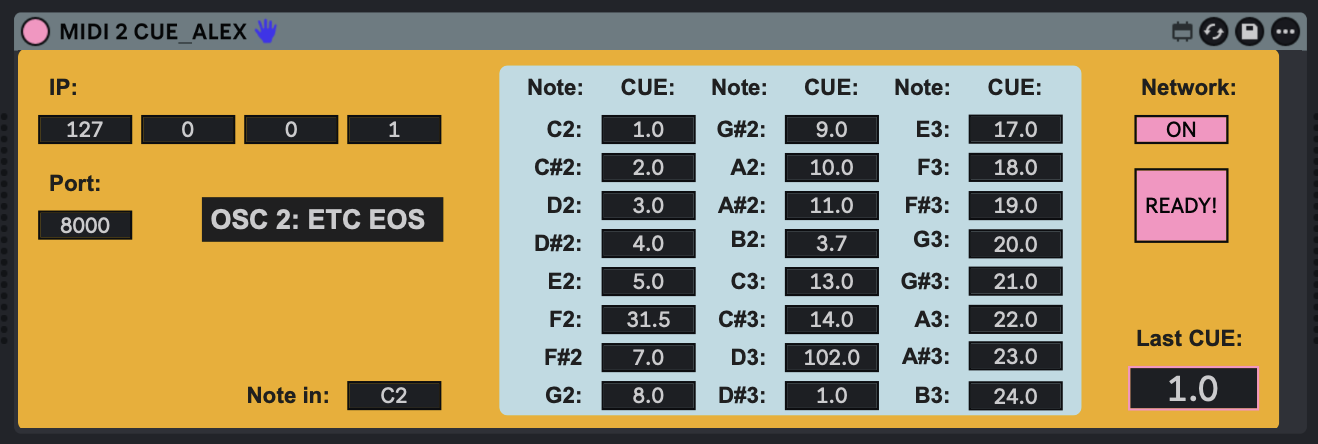
| Description: | Ableton / Max4Live Devices to control ETC-EOS Lightdesks via OSC / Audio & MIDI Hi there! I work as an audio engineer in theater, and I wanted to be able to precisely control lights and lighting cues along with audio. I was really unhappy with the existing options, so I decided to build my own Max for Live devices. If you are running a show with Ableton / M4L & ETC EOS, these devices might be just as useful for you. Here is an overview of how they work. All of the devices share these core features: • IP Box: Enter the IP address of your ETC EOS lighting console here (Default: 127.0.0.1 / localhost). • OSC Port: Enter the network port you are using (Default: 8000). • Network Switch: Turn the network connection on or off. I recommend turning it off while writing automation to avoid creating chaos on the lighting desk. • "READY" LED: After loading the plugin into Ableton, it takes 2 seconds for the network connection to initialize. This intentional delay prevents an initial "network bump" from accidentally sending a CUE 0 / Blackout command to the EOS console. MIDI 2 CUE: Trigger lighting cues effortlessly using MIDI data. You can play MIDI notes live via any external MIDI controller or launch MIDI clips directly from Ableton to automate your show. • Customizable Cues: Easily map MIDI notes to specific cue numbers on your lighting desk. • Flexible Triggering: Perfect for manual live performance or fully automated, time-accurate playback. Video: https://youtu.be/cddaivPzjhc?si=UaABjGyQwufhDMEF |
Details
| Live Version Used: | 12.0.5 |
| Max Version Used: | 8.6.2 |
| Date Added: | Jul 06 2026 11:51:24 |
| Date Last Updated: | No Updates |
| Downloads: | 0 |
| Website: | https://alexxaudio.gumroad.com/l/midi2cue |
| ⓘ License: | Commercial |
Average Rating
Log in to rate this device |
-n/a- |
Login to comment on this device.
Browse the full library