Device Details


Overview

Name | Version: NOTE BUDDY 1.2
Author: marcmalade
Device Type: MIDI Effect
Description: Watch the full tutorial and see NOTE BUDDY in action:

https://youtu.be/TJuK9Dqalfo

------------------------------------------------------------
https://arthurlombard.gumroad.com/l/note_buddy
------------------------------------------------------------

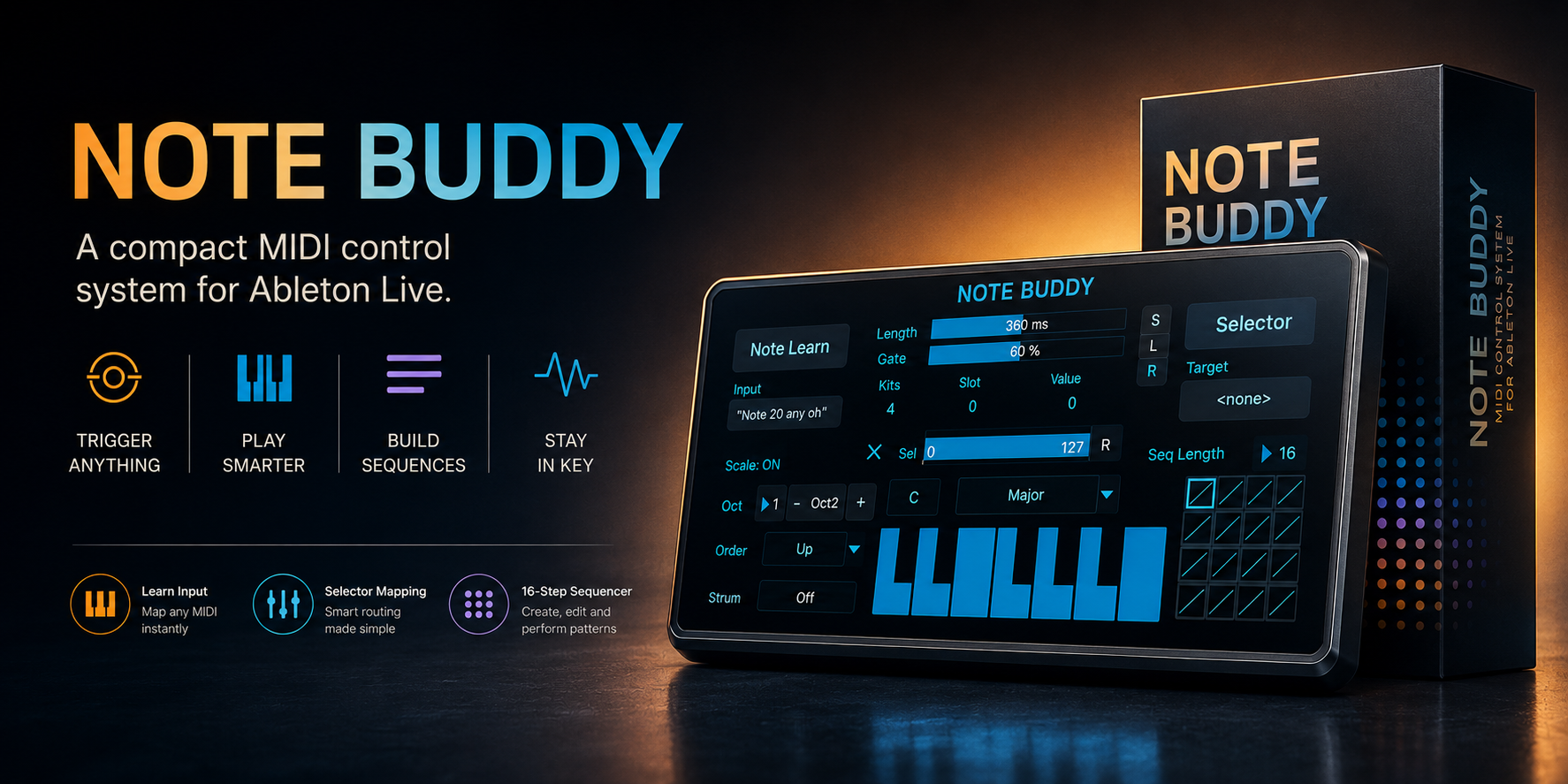
NOTE BUDDY is a Max for Live MIDI device that turns one pad, trigger, key, footswitch, or MIDI CC into a selector controller, chord trigger, 16-step sequencer, and tempo-synced ARP.

Because one MIDI note can do much more than play one note.

With one learned input, NOTE BUDDY can switch Rack chains, change drum kits, browse sounds, generate scale notes, trigger chords, play harmonic sequences, or launch tempo-synced arpeggios inside Ableton Live.

Originally designed for hybrid drummers using pad controllers and SPD-S style setups, NOTE BUDDY is also useful for producers, keyboardists, live performers, sound designers, and VJs.

One trigger in.
Selectors, chords, sequences, ARPs, and performance control out.

------------------------------------------------------------

WHAT NOTE BUDDY DOES

NOTE BUDDY is a compact performance brain for Ableton Live.

It can:

- Learn an incoming MIDI note or CC
- Map one trigger to Rack Chain Selectors, macros, sliders, buttons, or device parameters
- Step through drum kits, sample banks, FX chains, instrument layers, or visual states
- Generate notes from scales, Chromatic mode, or custom User scales
- Trigger full chords from a single pad or key
- Play polyphonic 16-step melodic or harmonic sequences
- Store notes, ties, order, octave, base octave, and strum per sequence step
- Create free strums in milliseconds
- Create tempo-synced ARP sequences from 1/1 to 1/64
- Save and load 16 complete internal presets from the sequence grid

------------------------------------------------------------

MAIN FEATURES

MIDI LEARN INPUT

Click Note Learn, hit your pad, key, trigger, footswitch, or send a MIDI CC.

NOTE BUDDY remembers it and uses it as the command input.

Great for drum pads, kick/snare triggers, MIDI keyboards, footswitches, Ableton clips, external sequencers, and hybrid drum setups.

------------------------------------------------------------

SELECTOR MAPPING

Click Selector, then click any mappable Ableton parameter.

Use NOTE BUDDY to control:

- Drum Rack Chain Selectors
- Instrument Rack Chain Selectors
- Audio Effect Rack chains
- Macros
- Filter cutoff
- Sample selectors
- Device buttons
- Custom 0-127 ranges
- Reversed ranges

Use Sel mode for clean stepped selector changes.

Use slider/range behavior for macros, filters, FX sweeps, and expressive control.

------------------------------------------------------------

RACK CHAIN SELECTOR CONTROL

Move through Rack chains with one trigger.

Example with 4 kits:

Kit 1 -> Kit 2 -> Kit 3 -> Kit 4 -> Kit 1...

Perfect for switching drum kits live, rotating snare or sample variations, browsing Instrument Rack layers, changing FX chains during a song, or triggering VJ clip and visual states.

------------------------------------------------------------

SCALES, CHORDS AND CHROMATIC MODE

NOTE BUDDY can generate musical MIDI notes, not only selector values.

Choose:

- Root note
- Scale preset
- Chromatic mode
- Custom User scale
- Octave range
- Base octave
- Order behavior
- Note length
- Gate length

The built-in mini keyboard lets you create custom scales and select up to all 12 chromatic notes.

Turn one incoming trigger into a full chord, a melodic phrase, a bass movement, a scale-safe note, or a controlled harmonic gesture.

------------------------------------------------------------

ORDER MODES

ORDER controls how notes are played, voiced, inverted, distributed, randomized, or arpeggiated.

Outside Sequence mode, ORDER defines how triggers move through scale notes.

In Sequence mode, ORDER becomes a voicing engine for each step, making the same notes feel tighter, wider, inverted, bass-heavy, top-note focused, random, or arp-like.

------------------------------------------------------------

16-STEP SEQUENCE MODE

Sequence mode gives NOTE BUDDY a polyphonic 16-step sequencer.

Each step can store:

- One note or multiple notes
- Chords
- Tie / silence
- Order mode
- Octave range
- Base octave
- Strum value
- Strum sync state

Set SEQLENGTH from 1 to 16.

Steps outside the active length are muted but keep their content.

One trigger advances through the sequence.

------------------------------------------------------------

STRUM AND ARP SEQUENCE

Strum has two modes.

Free Strum spreads chord notes in milliseconds for human timing, guitar-like rolls, slow harmonic blooms, or rhythmic chord attacks.

Tempo-Synced Strum / ARP Sequence locks the movement to Ableton Live’s tempo.

Available divisions:

1/1, 1/2, 1/4, 1/8, 1/12, 1/16, 1/24, 1/32, 1/48, 1/64

In sync mode, NOTE BUDDY loops the notes inside the current sequence step as an ARP.

The ARP stays on that step until your trigger moves to the next one.

------------------------------------------------------------

SAVE AND LOAD PRESETS

NOTE BUDDY v1.2 includes internal Save and Load.

The 16 sequence grid slots also work as 16 preset memory slots.

To save:

1. Build your setup
2. Click S
3. Click one of the 16 slots

To load:

1. Click L
2. Click a saved slot

Each preset slot stores the complete device state:

mapping, range, scale, sequence, notes, ties, order, octaves, strum, length, gate, and performance settings.

To keep presets after closing Live, save the Ableton Set or save NOTE BUDDY as an .adv preset in your Ableton User Library.

------------------------------------------------------------

WHO IS NOTE BUDDY FOR?

DRUMMERS

Use one pad, drum trigger, or SPD-S style controller to switch kits, rotate samples, control Rack chains, or launch harmonic movement without touching the computer.

PRODUCERS

Browse sounds, build chord ideas, switch FX chains, sketch progressions, and add movement from a single MIDI note.

KEYBOARDISTS AND MUSICIANS

Trigger chords and progressions without complex fingerings. Use one key, pad, or footswitch to move through programmed harmony.

LIVE PERFORMERS

Prepare complex changes in advance, then control them from one reliable trigger on stage.

VJs AND MULTIMEDIA PERFORMERS

Map NOTE BUDDY to visual selectors, clip changes, FX parameters, or live media states.

------------------------------------------------------------

EXAMPLE USE CASES

1. ONE PAD, MULTIPLE DRUM KITS

Map NOTE BUDDY to a Drum Rack Chain Selector.

Each hit selects the next kit.

2. ONE NOTE, FULL CHORD

Enable Scaler ON, choose a scale, select Chord Trigger or another Order mode, then hit one pad.

3. ONE TRIGGER, 16 CHORDS

Set Scale to Sequence.

Program chords into the 16 grid steps.

Each trigger advances to the next chord.

4. TEMPO-SYNCED ARP FROM ONE STEP

Enable synced strum in Sequence mode.

The current step’s notes loop as an ARP until the next trigger moves forward.

5. FX CHAIN BROWSING

Map NOTE BUDDY to an Audio Effect Rack Chain Selector and move through clean, delay, distortion, filter, glitch, reverb, granular, or lo-fi chains.

6. VISUAL CLIP SWITCHING

Map NOTE BUDDY to a VJ parameter or clip selector and step through visual states from one MIDI trigger.

------------------------------------------------------------

REQUIREMENTS

- Ableton Live
- Max for Live
- One MIDI track
- Optional MIDI controller, pad controller, footswitch, drum module, SPD-S style controller, or external sequencer

------------------------------------------------------------

INCLUDED

- NOTE BUDDY Max for Live MIDI device
- English PDF user manual
- Quick Start section
- Detailed feature explanations
- Performance examples

------------------------------------------------------------

RELEASE NOTES

v1.2

- Save and Load functions are fully working
- 16 internal preset slots available from the sequence grid
- Click S + one slot to save a complete preset
- Click L + one slot to load it
- Presets can be kept with the Live Set or by saving the device as an .adv in the Ableton User Library
- Added Chromatic mode
- Added tempo-synced Strum / ARP Sequence mode
- Synced strum divisions from 1/1 to 1/64
- Sequence mode supports polyphonic steps, ties, per-step order, octave, base octave, and strum behavior

------------------------------------------------------------

Created by Arthur Lombard.

Details

Live Version Used: 12.0.5
Max Version Used: 8.6.2
Date Added: May 17 2026 14:22:31
Date Last Updated: No Updates
Downloads: 0
Website: https://arthurlombard.gumroad.com/l/note_buddy
License: None
Average Rating

Log in to rate this device

-n/a-


Login to comment on this device.

Browse the full library