Device Details
Overview
| Name | Version: | Move4Live 1.0 |
| Author: | PantaFlux |
| Device Type: | Audio Effect |
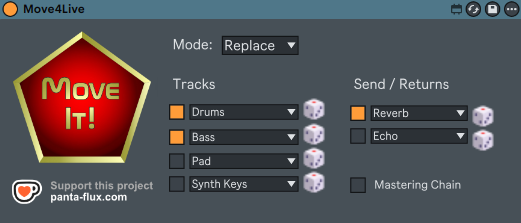
| Description: | The Ableton Move gets one thing exactly right: the moment you start a new set, you can just play. Four randomly chosen instruments, no setup, no “where do I even begin?” – you're making music immediately instead of making decisions. Move4Live brings that idea to Ableton Live on the desktop. One button. Four ready-to-play tracks – e.g. Drums, Bass, Pad, Synth Keys – with randomly selected presets from your library. Add optional return tracks and a mastering chain modeled directly after the one the Ableton Move uses in every new set. It started as a personal tool, built in the gaps of everyday life. Released because it might be useful for other musicians and bedroom producers too. — INSTRUMENT TRACKS · Up to four tracks with freely chosen categories · Random presets from your installed Ableton library · Re-roll individual tracks without touching the rest · ‘Replace’ mode (overwrite existing tracks) or ‘Add’ mode (keep and add tracks) RETURN TRACKS & MASTERING CHAIN · Up to two return tracks with random effect presets from a curated selection · Re-roll individual effects per return track · Optional mastering chain: Punch Glue → Compressor → Analog Clip → Limiter CONVENIENCE · Settings saved between sessions · Runs entirely inside Ableton Live – no external app required — REQUIREMENTS · Ableton Live 11.3.13+ or 12 Suite with Max for Live · Windows 10/11 (verified) · macOS (should work, untested) — Donationware – free to use. If it saves you time or sparks something, a small tip via Ko-fi is always appreciated. |
Details
| Live Version Used: | 11.3.13 |
| Max Version Used: | 8.6.2 |
| Date Added: | Apr 19 2026 13:20:25 |
| Date Last Updated: | No Updates |
| Downloads: | 0 |
| Website: | https://panta-flux.com/en/products/move4live/ |
| ⓘ License: | None |
Average Rating
Log in to rate this device |
-n/a- |
Login to comment on this device.
Browse the full library