Device Details
Overview
| Name | Version: | Latch and Play 0.0.2 |
| Author: | swina |
| Device Type: | MIDI Effect |
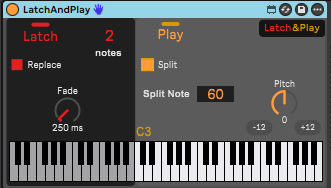
| Description: | Latch&Play MIDI device for AbletonLive Standard/Suite with Max4Live Latch&Play is a powerful MIDI utility designed for Max for Live that allows you to "capture" and hold MIDI notes (latch) while providing flexible options for splitting the keyboard, replacing notes, and transposing output. Core Features 1. Latch Mode ------------------------------------ The primary function of the device. When enabled, MIDI "Note On" messages are stored and held indefinitely. Active: Notes are latched and stay on. Inactive: Notes pass through normally. A Fade Out duration can be applied when disabling Latch to smoothly release held notes. 2. Keyboard Splitting ------------------------------------------ - Split your keyboard into two zones for multi-functional playing. - Split Point: A user-definable MIDI note (default: 48 / C2). - Lower Zone: Notes played below the split point are processed by the latching logic. - Upper Zone: Notes played above the split point "Pipe Through" directly to the output without being latched. 3. Note Replacing (Voice Management) ------------------------------------------- Manage how the device behaves when you exceed the polyphony limit. - Polyphony Limit (notes input ctrl): Set the maximum number of notes that can be latched simultaneously. - Note Replace (Replace checkbox): When active, playing a new note after reaching the limit will automatically release the oldest latched note and replace it with the new one (FIFO - First In, First Out). When is OFF and latched notes are playing all incoming notes are playing normally 5. Transposition ------------------------------------------ Adjust the pitch of all outgoing MIDI notes. Transpose: Shift notes by semitones. Octave Shift: Quick controls for jumping up or down by 12 semitones. You can get all the project at: https://github.com/swina/M4L-Latch-And-Play |
Details
| Live Version Used: | 12.3.6 |
| Max Version Used: | 8.6.2 |
| Date Added: | Mar 26 2026 09:54:31 |
| Date Last Updated: | Mar 27 2026 08:58:22 |
| Downloads: | 0 |
| Website: | https://swinallen.gumroad.com/l/latchandplay |
| ⓘ License: | AttributionNonCommercialNoDerivatives |
Average Rating
(1) Log in to rate this device |
3 |
Comments
hi - it's a frozen device, but it is throwing errors, none of the js seems to have been properly included?
Posted on March 26 2026 by wetterberg |
Report Issue
Not working with Ableton 12.2.7/MacOS
Posted on March 26 2026 by stevefrances |
Report Issue
Sorry for the problem.
Published version 0.0.2 that should fix the problem.
Let me know if any other issue.
Published version 0.0.2 that should fix the problem.
Let me know if any other issue.
Posted on March 27 2026 by swina |
Report Issue
Same with 0.0.2 device not working. Seems an interesting idea. Please fix it. Thanks!
Posted on March 27 2026 by stevefrances |
Report Issue
If anyone is still having problem you can contact me directly to my email : swina.allen@gmail.com
Please describe the exact problem with the following information.
Ableton Live Standard/Suite version
Max4Live version
Thanks
Please describe the exact problem with the following information.
Ableton Live Standard/Suite version
Max4Live version
Thanks
Posted on March 27 2026 by swina |
Report Issue
Since the project is completely opensource you can find all the base code here:
https://github.com/swina/M4L-Latch-And-Play
- Max4Live adv file
- JS latch.js
- amxd files v. 0.0.1 and v. 0.0.2
https://github.com/swina/M4L-Latch-And-Play
- Max4Live adv file
- JS latch.js
- amxd files v. 0.0.1 and v. 0.0.2
Posted on March 27 2026 by swina |
Report Issue
This is a very good device that works well overall.
However, it is missing a few essential improvements that would make it a must-have.
1. The split point should be selectable by simply pressing a key on the keyboard, rather than entering a MIDI note number.
2. The LATCH section needs an additional feature: a reset timer that completely clears the currently latched chord after a configurable period of inactivity.
Example:
* I set the maximum number of latched notes to 3
* I play a C minor (3 notes) → works correctly.
* Then I play an Fsus2 (2 notes) → the device no longer works correctly because it is still waiting for a third note
**Proposed solution:**
Add a configurable Reset Timer in Ms.
For example, if the Reset Timer is set to 2 ms, then whenever no note has been played in the LATCH section for the next 2 ms, the currently latched chord should be completely cleared. The next note played should automatically start a new chord.
This would allow seamless transitions, for example from Cmin to Fsus2, and the device would behave correctly in both cases.
However, it is missing a few essential improvements that would make it a must-have.
1. The split point should be selectable by simply pressing a key on the keyboard, rather than entering a MIDI note number.
2. The LATCH section needs an additional feature: a reset timer that completely clears the currently latched chord after a configurable period of inactivity.
Example:
* I set the maximum number of latched notes to 3
* I play a C minor (3 notes) → works correctly.
* Then I play an Fsus2 (2 notes) → the device no longer works correctly because it is still waiting for a third note
**Proposed solution:**
Add a configurable Reset Timer in Ms.
For example, if the Reset Timer is set to 2 ms, then whenever no note has been played in the LATCH section for the next 2 ms, the currently latched chord should be completely cleared. The next note played should automatically start a new chord.
This would allow seamless transitions, for example from Cmin to Fsus2, and the device would behave correctly in both cases.
Posted on June 27 2026 by papopap |
Report Issue
Login to comment on this device.
Browse the full library