Device Details
Overview
| Name | Version: | DrumGates 1.1 |
| Author: | Gross9978 |
| Device Type: | MIDI Generator |
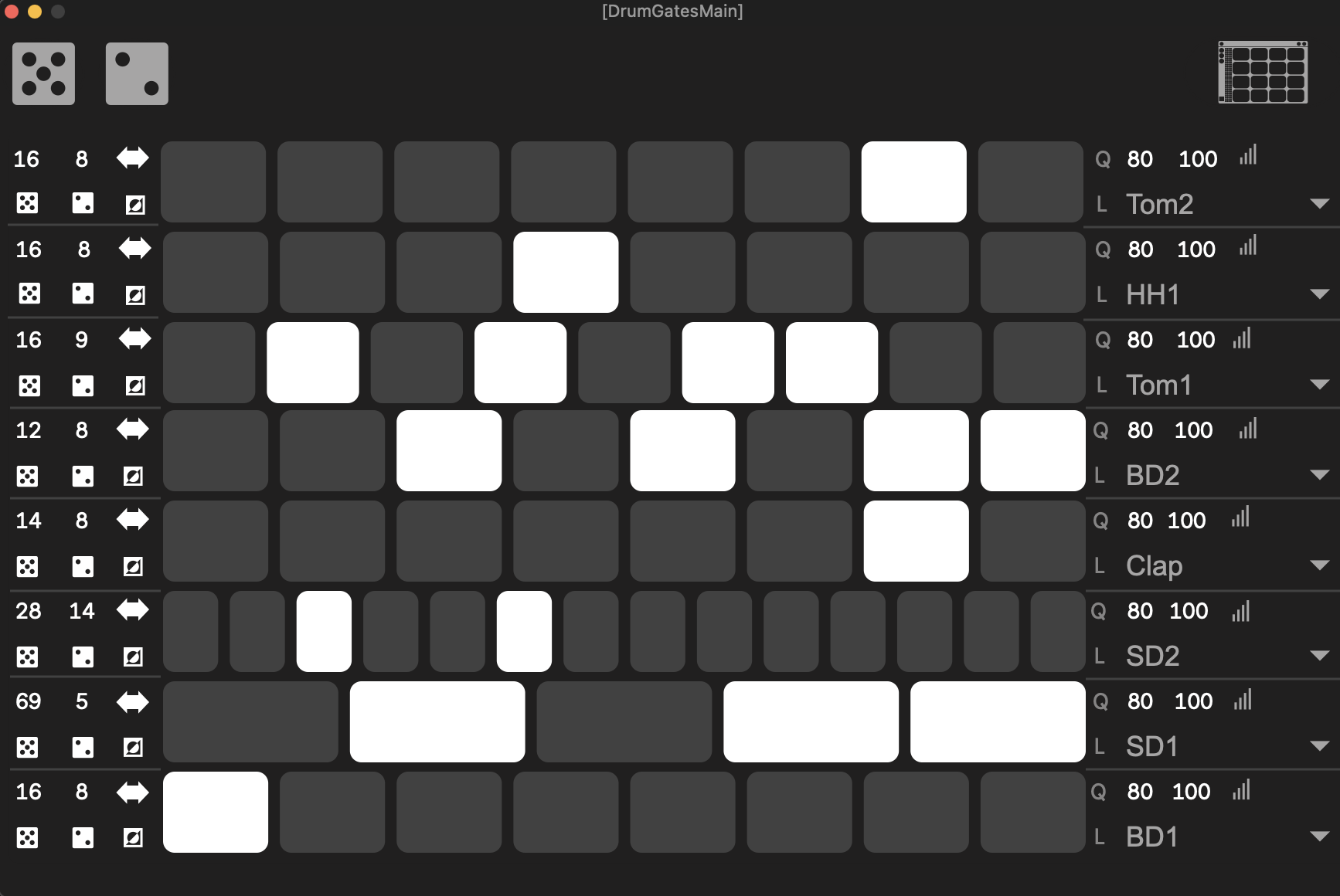
| Description: | 1.1 Added UI scaling DrumGates uses the UI from my 3Gates tool for creating drum patterns. In a popout window, clicking the drum rack icon will populate the menus on the right with the first 16 cells of a drum rack on the track. Clicking on a square will create notes for than cell. Each lane has controls for- Left Side- Total notes created. Length of the pattern to repeat within the total amount. rotate randomize scramble invert pattern Right Side- Q- quantize the notes to the current grid. L- makes note legato. Velocity Range. Drumrack cell to use for pitch. Its makes it pretty quick and easy to make polymeric type patterns. |
Details
| Live Version Used: | 12.2 |
| Max Version Used: | 9.0.7 |
| Date Added: | Jun 12 2025 01:00:49 |
| Date Last Updated: | Jun 22 2025 01:18:54 |
| Downloads: | 691 |
| ⓘ License: | AttributionNonCommercialShareAlike |
Average Rating
(1) Log in to rate this device |
5 |
Files
| Device File: | DrumGates.amxd |
Comments
Looks interesting - downloads but then doesn't open in Ableton...
Posted on June 12 2025 by Trotskysghost |
Report Issue
Looks interesting - downloads but then doesn't open in Ableton...
Posted on June 12 2025 by Trotskysghost |
Report Issue
This is incredible man, the floating window makes it feel like a plugin, and the generator itself leaves all the drum pattern plugins I've tried in the dust.
Posted on June 12 2025 by carlosbtlr |
Report Issue
Only thing I would add is global controls to set all the individual parameters like quantization, legato, velocity range, steps number, subdivision and invert from all the lanes at once like you did with random and scrambler.
Posted on June 12 2025 by carlosbtlr |
Report Issue
Trotskysghost ,make sure you’re on live 12.2?
Carlos, yeah that’s a good idea haha
Carlos, yeah that’s a good idea haha
Posted on June 12 2025 by Gross9978 |
Report Issue
Loving it!
Maybe a wee bug tho: Adjusting the velocity range on a single row of notes seems to change the velocity range of notes on OTHER rows.
Maybe a wee bug tho: Adjusting the velocity range on a single row of notes seems to change the velocity range of notes on OTHER rows.
Posted on November 18 2025 by GiantEar |
Report Issue
Glad you dig it:) The range of other lanes shouldn’t be affected but it’s probably re randomizing the velocities every time anything gets changed on the ui. I’ll check it out one day when I get a chance:)
Posted on November 18 2025 by Gross9978 |
Report Issue
Ah yes, it looks like your are right, randomizing.
One feature "request" would be a Clear button on each row.
Thanks for making this, and for giving it away. Very generous.
One feature "request" would be a Clear button on each row.
Thanks for making this, and for giving it away. Very generous.
Posted on November 18 2025 by GiantEar |
Report Issue
Yeah for sure man:) thanks for the suggestion:)
Posted on November 18 2025 by Gross9978 |
Report Issue
Like others I can't use it in Ableton Live 12.2.
It says it contains midi tools and midi tools can't be used as devices in Ableton live.
????
It says it contains midi tools and midi tools can't be used as devices in Ableton live.
????
Posted on November 24 2025 by Calagan |
Report Issue
It is in fact a "Midi Tool". Add it to the folder with other Midi Tools, then it will appear as an option in the Generative section.
Posted on November 24 2025 by GiantEar |
Report Issue
I'm loving this device Greg, but I'm trying to enable key mapping for the button that opens and closes the popup window so that I can open and close it more quickly inside of Live, but it won't let me key map it, even though in the Max inspector it says that the button is visible to mapping. Another great improvement would be a set of global controls like the ones you did for randomization and shuffling, but for the other parameters like total steps, steps, rotation, inversion, legato, quantization and velocity range.
Posted on January 20 2026 by carlosbtlr |
Report Issue
Yeah I think that’s a current limitation with the key mapping , same as midi mapping as far as I know?
It works on the stock ones but not the custom ones I think.
It works on the stock ones but not the custom ones I think.
Posted on January 21 2026 by Gross9978 |
Report Issue
Login to comment on this device.
Browse the full library