Device Details
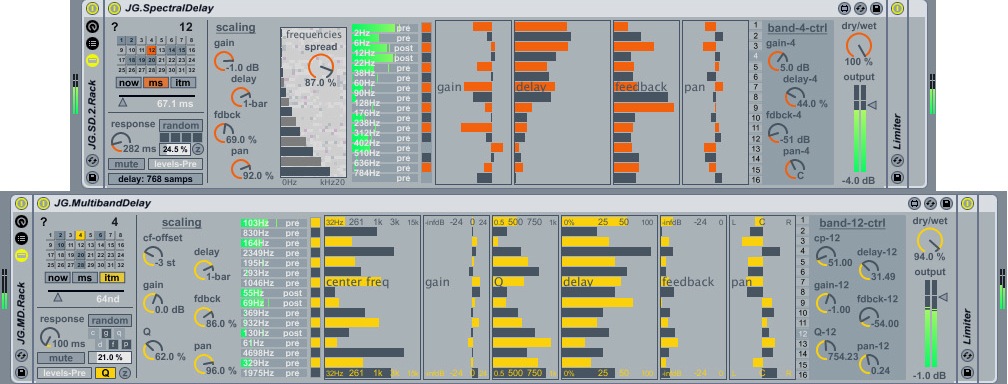
Overview
| Name | Version: | JG.Delays 2.0.3 |
| Author: | pp |
| Device Type: | Audio Effect |
| Description: |
Details
| Live Version Used: | 8.2.2 |
| Max Version Used: | 5.1.8 |
| Date Added: | Dec 30 2009 12:13:05 |
| Date Last Updated: | May 22 2011 05:26:28 |
| Downloads: | 16402 |
| ⓘ License: | AttributionNonCommercialShareAlike |
Average Rating
(10) Log in to rate this device |
4 |
Files
| Device File: | JG.Delays.zip |
Comments
Edit: the presets ate midi-selectable, excellent. The morphing will take place instantly though, regardless of the preset-glide setting. (Just reporting back)
Posted on December 30 2009 by AuralBee |
Report Issue
great. thx for sharing.
Posted on December 30 2009 by eltnet |
Report Issue
pp here: @AuralBee - glad you like it. to confirm - yes, my computer is so old and slow i cannot actually use the preset gliding 'live' without massive cpu jumps. this is why i intentionally chose to make the midi-automatable preset-selecting NOT go through the glide feature, but happen instantly. this is a limitation of the way the patch is coded - in a cpu intensive way. there are other ways to do all this. make sure you click on the "?" icon and read the help file - you will find web links to the original patch coder there, some links to other spectral delay examples and explanations of how to get around a couple of the limitations and why things are as they are. enjoy.
Posted on December 31 2009 by pp |
Report Issue
pp here: i have now added an on/off switch to the preset gliding function. default at start-up is 'off'. this way you can decide whether or not to go for the full cpu spikes. this now works with mouse clicking and/or automation/modulation. also new random function, etc...
Posted on December 31 2009 by pp |
Report Issue
@pp: I am deeply honoured! Thanx & happy NY to you man.
Posted on January 01 2010 by AuralBee |
Report Issue
Hey pp, me again :-)
You are working hard & fast man.
Latest version gives me no processed sound, parameters are moving, but only dry sound is audible.
Selecting different quality makes no difference (but seems like an excellent idea!)
You are working hard & fast man.
Latest version gives me no processed sound, parameters are moving, but only dry sound is audible.
Selecting different quality makes no difference (but seems like an excellent idea!)
Posted on January 02 2010 by AuralBee |
Report Issue
awesome!
Posted on January 02 2010 by lek |
Report Issue
oh dear, humble apologies - i was trying to add too much too quick, very annoying of me. however @AuralBee (+others?), is it the "1.1" version you have? - that was the stupid version i screwed up and it lasted a few hours. version 1.2 should fix the 'no sound' issue and other things. please confirm / let me know. it is working here, but i will take another look and report back...
Posted on January 02 2010 by pp |
Report Issue
pp here:
ok everyone --- download version 1.4... it actually... WORKS, all of the time. sorry about that. seems i was having troubles with the way m4l reads pfft~s inside of poly~s, and some other silly stuff that happens when freezing / etc.
again, sorry. enjoy. and please feel free to feedback on usage / bugs etc...
ok everyone --- download version 1.4... it actually... WORKS, all of the time. sorry about that. seems i was having troubles with the way m4l reads pfft~s inside of poly~s, and some other silly stuff that happens when freezing / etc.
again, sorry. enjoy. and please feel free to feedback on usage / bugs etc...
Posted on January 02 2010 by pp |
Report Issue
Thanks pp. 5 stars device!
Posted on January 24 2010 by SrAye |
Report Issue
hello, where should I put this? on wich folder?
thanks
thanks
Posted on March 31 2010 by robduro |
Report Issue
hi robduro.
technically it does not matter, but i keep all my devices organised as they are in live / mfl:
1. download from maxforlive.com
2. now move the '.amxd' file, called 'JG.SpectralDelay.amxd', TO your M4L AUDIO Effects folder. I.E. - [your Ableton Library]/Presets/Audio Effects/Max AUDIO Effect/...
3. Start Live and drop 'JG.SpectralDelay' into an AUDIO track... etc...
technically it does not matter, but i keep all my devices organised as they are in live / mfl:
1. download from maxforlive.com
2. now move the '.amxd' file, called 'JG.SpectralDelay.amxd', TO your M4L AUDIO Effects folder. I.E. - [your Ableton Library]/Presets/Audio Effects/Max AUDIO Effect/...
3. Start Live and drop 'JG.SpectralDelay' into an AUDIO track... etc...
Posted on April 03 2010 by pp |
Report Issue
more info / opinion, thanks to Lemubara:
http://www.lemubaratools.es/2010/03/01/j-g-spectral-delay/
http://www.lemubaratools.es/2010/03/01/j-g-spectral-delay/
Posted on May 01 2010 by pp |
Report Issue
more info / opinion, thanks to Lemubara:
http://www.lemubaratools.es/2010/03/01/j-g-spectral-delay/
http://www.lemubaratools.es/2010/03/01/j-g-spectral-delay/
Posted on May 01 2010 by pp |
Report Issue
Great Device. Thanks for sharing. However, Everytime I close a live set or preset and re-open it this device randomizes all my parameters. Any suggestions on how to stop this???
Posted on September 18 2010 by Netrik |
Report Issue
@Netrik and others, apologies for relative silence:
version 2 is here, uploaded May 2011. Your bugs/issues are fixed and many new features are added.
Enjoy / let me know how it goes...
- pp .
version 2 is here, uploaded May 2011. Your bugs/issues are fixed and many new features are added.
Enjoy / let me know how it goes...
- pp .
Posted on May 12 2011 by pp |
Report Issue
Hey It's nice!!! But would be even nicer if you could type in the Frequencies (CP's) exactly, without needing to turn the nob and get a numb hand getting that frequency right. Most of the time you don't get it, its mostly always 10 hz some time only 1 hz above the wanted one. That would be great, really do need that accurateness. Would do it myself but my skills aren't that good yet in max. Have a wonderful dream. Thanks again!
In Lak'ech
In Lak'ech
Posted on June 30 2011 by antimaterium |
Report Issue
Hi! WARNING to users of this device.
This device is amazing however there is a SERIOUS bug if you upgrade to Max 7.1. Up to version 7.0 it worked. Windows user here.
When you upgrade to Max 7.1 - parameters such as center freq, gain, q, delay, feedback will NOT be recalled inside your project and there is a good choice to blow up your speakers unless you have limiter on master Bus.
I tried everything and there is a workaround. But definitely it is a bug. Don't know is it Max bug or this device bug. Rolling back to Max v7.0 i could load correct project parameters.
I tried every trick which did not worked such as saving specific device as a single ableton preset format, group it in to rack and save it as a rack format but no. After you upgrade to v7.1 it won't recall presets. This worked up to max 7.1. Other max plugins works correctly so i am just guessing it's this device bug not Max bug but i can't claim which one is responsible for issue.
Workaround: you have to use plugin own preset management. So if you are on Max v7.0 you can load project correctly but then you have to do this:
Save your prest (shift-click) in plugin own slot number 1 (out of 32). Then save it as a separate ableton preset. You can save project.
Then after you upgrade to Max 7.1 and when you load project - parameters won't be recalled but remember we saved parameters in slot 1. Just left mouse click on slot 1 and parameters are there recalled correctly. Project will play fine but you'll have to do this (recall parameters from slot 1) every time you load project.
Hopefully developer will look into this. It's such an amazing plugin.
This device is amazing however there is a SERIOUS bug if you upgrade to Max 7.1. Up to version 7.0 it worked. Windows user here.
When you upgrade to Max 7.1 - parameters such as center freq, gain, q, delay, feedback will NOT be recalled inside your project and there is a good choice to blow up your speakers unless you have limiter on master Bus.
I tried everything and there is a workaround. But definitely it is a bug. Don't know is it Max bug or this device bug. Rolling back to Max v7.0 i could load correct project parameters.
I tried every trick which did not worked such as saving specific device as a single ableton preset format, group it in to rack and save it as a rack format but no. After you upgrade to v7.1 it won't recall presets. This worked up to max 7.1. Other max plugins works correctly so i am just guessing it's this device bug not Max bug but i can't claim which one is responsible for issue.
Workaround: you have to use plugin own preset management. So if you are on Max v7.0 you can load project correctly but then you have to do this:
Save your prest (shift-click) in plugin own slot number 1 (out of 32). Then save it as a separate ableton preset. You can save project.
Then after you upgrade to Max 7.1 and when you load project - parameters won't be recalled but remember we saved parameters in slot 1. Just left mouse click on slot 1 and parameters are there recalled correctly. Project will play fine but you'll have to do this (recall parameters from slot 1) every time you load project.
Hopefully developer will look into this. It's such an amazing plugin.
Posted on January 17 2016 by maky357 |
Report Issue
Login to comment on this device.
Browse the full library
That preset glide thing is awesome too, but if I use longer glides it gets very processor hungry; does that happen with you too ?
I am totally incapable of programming, but do you think it would be possible to make the preset-selection midi-automatable ? In combination with the presetmorphing the idea alone makes me drool.
Sorry just dreaming aloud; thanks once again!